|
Image Upload |

|

|

|
||
|
Image Upload |
|
|

|

|
Image Upload
|
Image Upload |
|
|
|
||
|
Image Upload |
|
|
|
|
The Image question type allows the respondent to upload an image with the suitable prompts.
Enter the 'Question Text' to create the instructions. On screen the question will look like this:

Question Elements:
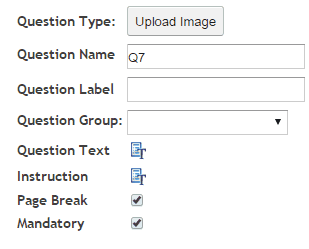
 : Enter the question text by clicking on the Question Text icon. A rich text editor box appears where you type your question. You have full rich text control over the question formatting.
 : Enter the instruction text by clicking on the Instruction text icon. A rich text editor box appears where you type your instructions. You have full rich text control over the question formatting.
 : Causes the following question to appear on a new screen (default) Un-click this box to turn off Page Break and cause the questions to appear on the same screen or page, one under each other.
 : If this box is checked then the question must be answered by the respondent to continue with the survey. Note the default setting is ‘True’.