|
Take Photo (CAPI only) |

|

|

|
||
|
Take Photo (CAPI only) |
|
|

|

|
Take Photo (CAPI only)
|
Take Photo (CAPI only) |
|
|
|
||
|
Take Photo (CAPI only) |
|
|
|
|
The 'Take Photo' is the same as the Upload IMAGE question type and allows the interviewer to take a photo to be uploaded with this surveys.
Enter the 'Question Text' to create the instructions. On screen the question will look like this:
Question Elements:
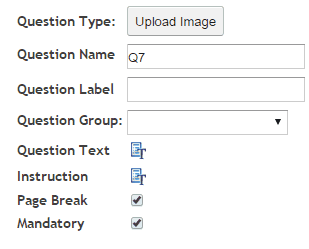
 : Enter the question text by clicking on the Question Text icon. A rich text editor box appears where you type your question. You have full rich text control over the question formatting.
 : Enter the instruction text by clicking on the Instruction text icon. A rich text editor box appears where you type your instructions. You have full rich text control over the question formatting.
 : Causes the following question to appear on a new screen (default) Un-click this box to turn off Page Break and cause the questions to appear on the same screen or page, one under each other.
 : If this box is checked then the question must be answered by the respondent to continue with the survey. Note the default setting is ‘True’.